
The Acctivate webstore sync can export the Warehouse "Availability" for all products that are set as "Available On Web". By Default, Acctivate will total the availability from warehouses for a product, but you can specifying certain Warehouses when exporting as well.
New Shopify & WooCommerce webstore connectors:
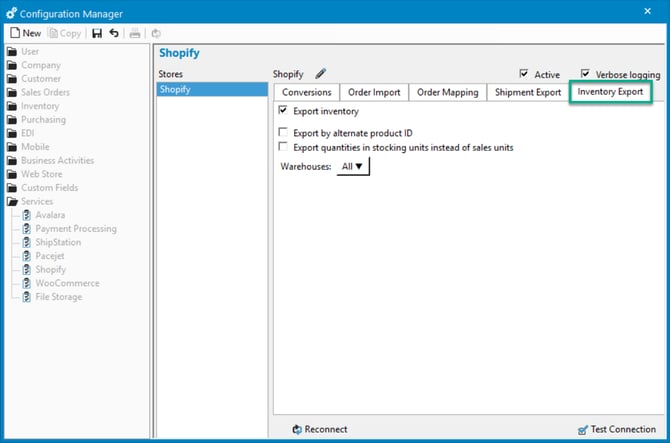
- Select File > Configuration Management > Services > Shopify/WooCommerce.
- Select the "Export Inventory" tab.
- Click "Edit" to go into Edit mode.
- Enable "Export Inventory".
- Save changes.
Native Template, Other, & Legacy webstore connectors:
- Open the Web Store Sync window.
- Click "Configure...".
- Select your webstore template and click Edit.
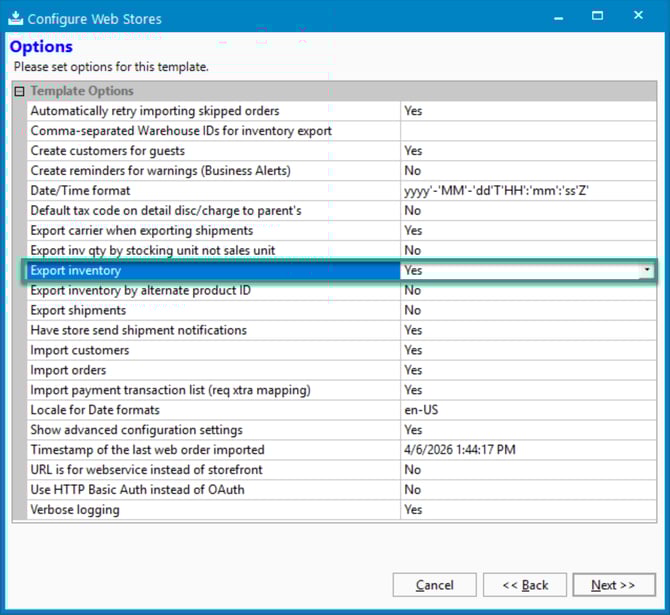
- Click "Next" until you reach the Options section.
- Set "Export Inventory" to "Yes".
- Save changes.